Meet the Librarian
Ask for your next book or podcast in plain words and get picks, series help, and TBR suggestions.
What the Librarian does
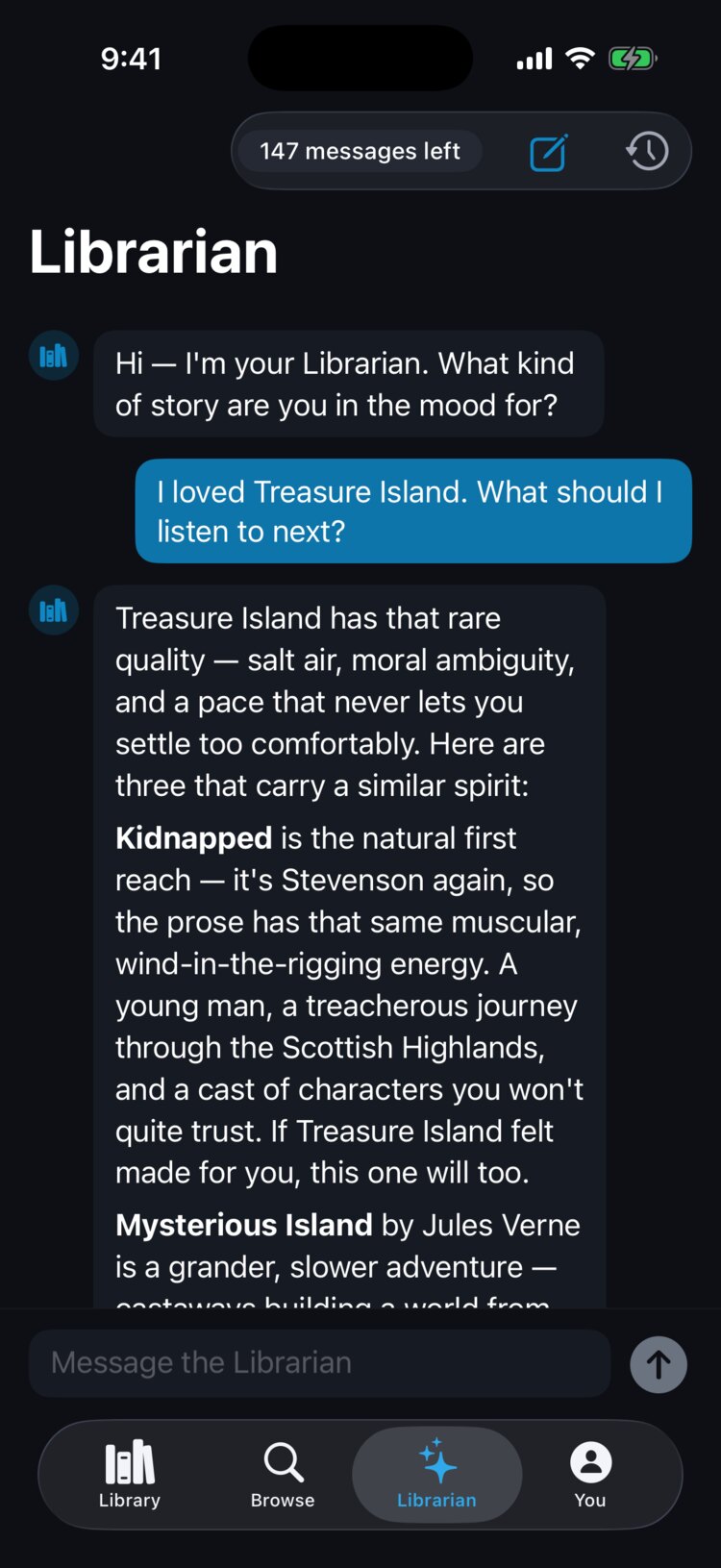
The Librarian is a reading assistant in its own tab. Ask in plain words, like "I loved Treasure Island. What should I listen to next?", and it suggests audiobooks and podcasts and explains why each one fits.
It can find the next book in a series you're listening to, and it adds a pick to your to-be-read (TBR) list when you ask it to. Your TBR list is in the Library tab under the TBR chip.
You don't need to ask for clean books. The Librarian picks for your taste and listening history, and your own filter settings decide what gets skipped when you play. If a pick has a lot of something you don't filter, the Librarian may mention it.
Who can use it
The Librarian is included with Premium and the 14-day free trial. On a free account, the Librarian tab offers a way to subscribe instead of the chat.
It needs AudioHaven 1.0.7 or later on iPhone, or 1.0.60 or later on Android. Child accounts in a family household can't use the Librarian.
If you'd rather not see it, turn off Show Librarian in Settings under AI to hide the tab.
Monthly messages
Premium includes 150 Librarian messages per month. The count at the top of the Librarian tab shows how many you have left, for example "147 messages left." Your allowance resets on the first of each month.
If you use them all, the Librarian tells you the date your messages reset.
Starting a new conversation
Tap the compose button at the top of the Librarian tab to start fresh. Tap the history button to open your past conversations and pick one up again.